
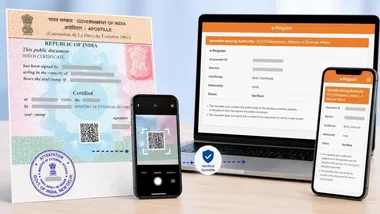
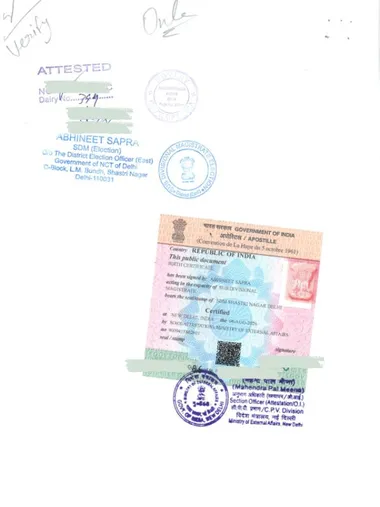
Every apostille the Ministry of External Affairs (MEA) issues — whether it’s called a “regular” apostille or an “e-Apostille (QR)” — is a physical stamp affixed to your physical document. That part never changes. The only real difference between the two is whether MEA also prints a QR code and a unique verification ID on it.
Regular Apostille vs e-Apostille (QR)
- Regular Apostille (no QR): MEA’s physical stamp on your document. No QR code, no unique verification ID. To verify it, a recipient has to contact the issuing authority directly.
- e-Apostille (QR): The same physical MEA stamp, plus a QR code and a unique verification ID. A recipient can check that ID online, in seconds, without contacting anyone.
Neither version is “digital-only” — both are physically stamped documents. The QR version just adds an extra, faster way to prove it’s genuine.
What is e-Sanad?
e-Sanad (esanad.nic.in) is a portal designed and developed by the National Informatics Centre (NIC) for the online submission and verification of documents. Its stated goal is a contactless, cashless, faceless, and paperless apostille and attestation service — currently for applicants in India, with a phased extension planned for applicants applying from abroad.
The portal is built around two distinct purposes:
1. Submitting a document for apostille/attestation
A logged-in applicant can submit documents for apostille or attestation directly through e-Sanad — either by scanning and uploading them, or by pulling them straight from DigiLocker — instead of applying in person at the issuing office.

We’ll cover the e-Sanad submission process in detail — scan-upload vs DigiLocker, what documents are accepted, and how it fits alongside using a service provider like us — in a dedicated article soon.
2. Verifying an apostilled document (e-Register)
e-Sanad also hosts the public e-Register. Under the Hague Apostille Convention, the Competent Authority issuing an apostille must keep a register recording its date, number, and the details of the person or authority whose signature/seal is on the underlying document. The e-Register puts that register online, so anyone can look up an apostille without contacting the Competent Authority directly.
MEA is separately developing and implementing its own e-Apostille system, but in the meantime its e-Register of apostilles is the one hosted on the e-Sanad portal — that’s the verification ID printed on an e-Apostille (QR), and it’s what the rest of this article walks through.
e-Sanad support varies by document type, issuing university/board, and destination requirements. Check our e-Sanad Document Issuing Authority (DIA) finder to see whether your specific board or university is integrated, or contact us and we’ll confirm whether your document qualifies for the e-Apostille (QR) route after a quick eligibility check.
How a Recipient Verifies Your Document
- They locate the Apostille/Attestation number printed alongside the QR code on your document.
- They open MEA’s e-Register verification page and enter that number plus a captcha.
- The e-Register confirms whether the number matches a genuine apostille MEA issued — no login required.
Live e-Register pages: esanad.nic.in/eregisterverification and esanad.nic.in/eregisterverify. Both ask for the document’s own ID/number — there’s no public sample document to browse; you’ll need the number printed on your specific apostille.
What the Public Result Actually Shows
Both e-Register pages return the same kind of result once the correct number and captcha are entered. Here’s a genuine “Verified” result from each:
Method 1 — lookup by Apostille/Attestation Number, at esanad.nic.in/eregisterverify:
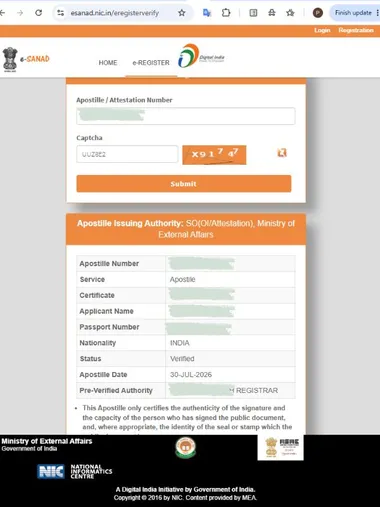
Method 2 — lookup by Document ID, at esanad.nic.in/eregisterverification:
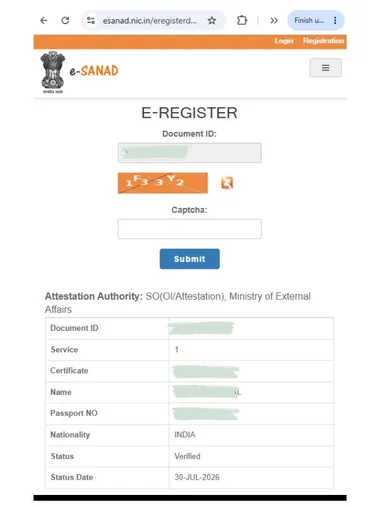
Anyone who has the Apostille/Attestation number or Document ID printed on your document — not just your intended recipient — can run this lookup and see the certificate type, your name, passport number, nationality, and verification status. We’ve blurred those fields in the screenshots above; the live e-Register shows them in full. Keep that in mind before sharing a scan of an e-Apostille (QR) document more widely than necessary.
Can a Recipient Reject Your Apostille?
Under the Hague Apostille Convention, an apostille issued correctly must be recognized wherever it’s presented in a member country. A receiving authority may lawfully refuse to recognize an apostille only when:
- Its origin can’t be verified — the details on the apostille don’t match the Competent Authority’s own register. This is exactly what the e-Register lookup above checks: if your Apostille/Attestation number or Document ID returns “Verified” with matching details, origin has been confirmed.
- Its formal elements differ radically from the Model Certificate annexed to the Convention — i.e., it’s missing the required fields entirely, not just formatted differently.

Design, size, and color vary between issuing countries’ apostilles, and even between apostilles from the same country over time — none of that is grounds for rejection. Specifically not valid reasons: the apostille “looks different” from ones the recipient has seen before; it was affixed by a different method than they’re used to (stamp vs. sticker vs. printed certificate); or it carries additional text outside the ten standard numbered fields. A genuine, verifiable Indian apostille cannot be turned away just because it doesn’t match a recipient’s expectations of what an apostille “should” look like.
If a university, employer, or office abroad pushes back on your Indian apostille for a cosmetic reason rather than a failed e-Register verification, this is the rule to point them to. The one narrow exception under the Convention: certificates labeled “Apostille” but issued by a country that isn’t a Convention member must be rejected everywhere else — that’s not a concern for MEA-issued apostilles, since India has been a Hague Apostille Convention member since 2005.

Having your apostille questioned abroad for reasons that don’t hold up? Contact us — we can help you point the recipient to the applicable Convention rule.
Which One Should You Choose?
- Pick e-Apostille (QR) if your destination — a university, employer, immigration office, or consulate — accepts digital/online verification. It’s faster for them to confirm and easier for you to share a copy in the meantime.
- Pick the regular apostille if the receiving authority insists on physical-only inspection with no online lookup step.
This is the same guidance we give on every VerifiedApostille service page’s “Original vs Copy” section — when in doubt, follow the recipient’s written checklist, and we’ll confirm the right route for your document before you pay.
Not sure which route your document needs? Contact us with a scan and your destination’s checklist — we’ll confirm Regular vs e-Apostille (QR) before you proceed.
Frequently asked questions
e-Apostille (QR) & e-Sanad FAQs
Is the e-Apostille (QR) a digital-only certificate?
No. Every apostille issued by MEA — regular or QR — is a physical stamp affixed to your physical document. The e-Apostille (QR) additionally carries a QR code and a unique verification ID that can be checked online. It is not a replacement for the physical document.
What is e-Sanad?
e-Sanad (esanad.nic.in) is a portal designed and developed by the National Informatics Centre (NIC) for contactless, cashless, faceless, and paperless apostille and attestation services, currently for applicants in India. It serves two purposes: applicants can log in to submit documents for apostille/attestation by scan-upload or DigiLocker, and anyone can use its public e-Register to verify an apostille online. It's also where the verification ID printed on an e-Apostille (QR) is checked.
Can I submit my documents for apostille directly through e-Sanad?
Yes — e-Sanad lets logged-in applicants submit documents for apostille or attestation by scanning and uploading them, or by pulling them directly from DigiLocker, instead of applying in person. We'll cover that submission process — scan-upload vs DigiLocker, what's accepted, and how it fits with using a service provider like us — in a separate article soon.
How does a recipient verify my document?
They take the Apostille/Attestation number printed next to the QR code and enter it on MEA's e-Register verification page, along with a captcha. The system confirms whether that number matches a genuine apostille MEA issued.
Which apostille should I choose — regular or QR?
Choose e-Apostille (QR) when your destination accepts digital verification — it lets the recipient confirm authenticity online in seconds. Choose the regular apostille when the authority requires physical-only inspection with no online check. We confirm the right choice after reviewing your destination's checklist.
Does the regular (non-QR) apostille expire or become harder to verify?
No — it doesn't expire. It simply has no QR code or online lookup; verification has to go through the issuing authority directly rather than MEA's e-Register.
Can a foreign authority legally reject my Indian apostille?
Only for two reasons under the Hague Convention: if its origin can't be verified against the Competent Authority's register, or if its formal elements differ radically from the Convention's Model Certificate. Differences in design, color, or affixing method, or extra text outside the ten standard fields, are explicitly not valid grounds for rejection.
